


Advertising on Facebook and Instagram is one of the most effective forms of digital marketing. Meta’s platforms have billions of active users, allowing businesses from all industries to reach their target audiences.
Running Facebook ad campaigns isn’t easy. There are many variables that you need to get right to have success. This is why companies hire Facebook ads specialists, also called Meta ads specialists since Facebook’s parent company renamed itself Meta.
Facebook ads specialists know the ins and outs of Meta advertising and how to generate the best results.
In this post, you'll learn the steps to follow to become a Facebook ads specialist. It's the same process we use to train new employees who join our Facebook Marketing team.
What Does a Facebook Ads Expert Do?
Facebook ads experts are responsible for building, monitoring, and optimizing advertising campaigns in Meta Ads Manager. The same campaigns run across Facebook, Instagram, Messenger, and Meta’s Audience Network.
They can work for a single brand, at a digital marketing agency where they handle multiple clients, or as freelancers.
Here are some of the important responsibilities of a Facebook ads specialist:
- Planning campaign strategy, structure, and budgets
- Choosing and building target audiences
- Creating or briefing ad creatives: images, videos, Reels, and ad copy
- Setting up tracking with the Meta Pixel and the Conversions API
- Analyzing campaign performance and making optimizations
- Reporting results to clients or managers, usually in terms of cost per acquisition (CPA) and return on ad spend (ROAS)
- Working with other marketers to optimize landing pages
- Staying up to date with changes to Meta’s advertising platform
How To Become a Facebook Ads Specialist
These are the 10 steps to follow to become a Facebook ads specialist.
- Build your Facebook ads skills and get certified
- Learn how to use Meta Ads Manager
- Understand how Facebook sales funnels work
- Set up the Meta Pixel, events, and custom conversions
- Understand custom, lookalike, and broad audiences
- Study the different ad placements and ad formats
- Learn how to create ad creatives
- Practice with your own small-budget campaigns
- Learn how to use Ads Manager reporting
- Build a portfolio and find your first clients
1. Build your Facebook ads skills and get certified
The first step to becoming a Facebook ads specialist is to learn Facebook ads and build the skills needed to carry out the various responsibilities of the role.
Some of the important skills you’ll need to build include:
- How to create a winning ad strategy
- Knowing what types of ad formats to use in different situations
- Selecting the best audience for campaigns
- How to design ad creatives that capture users’ attention
- How to write ad copy that converts
- How to measure results and optimize campaigns
The best way to begin learning about Facebook advertising is through online Facebook Ads courses.
With a good course, you’ll have all the important topics you need to know compiled together in a single resource. As a result, you won’t have to worry about finding what you should study next.
A good option is the Facebook Ads Course from Reliablesoft. The course includes 12 lessons, with PDF material and video tutorials, and teaches you how to design and set up Facebook and Instagram campaigns.
It covers everything you need to go from a beginner to a knowledgeable Facebook marketer.
As you learn, you also want to get certified. Certifications validate your skills and knowledge and help you stand out when looking for work as a Facebook ads specialist, and throughout your digital marketing career.
These are the certifications worth getting:
- Meta Certification – Meta’s official exams. Start with Digital Marketing Associate (beginner), then Media Buying Professional (intermediate), which matches the day-to-day work of a Facebook ads specialist. Meta offers free courses and study guides to prepare.
- Meta Social Media Marketing Professional Certificate – a 6-course beginner program on Coursera, around 5 months at 10 hours a week.
- Digital Marketing Certification by Reliablesoft – includes the Facebook Ads Course.
For a full comparison, see our list of the best Meta certifications.
2. Learn how to use Meta Ads Manager
The next step is to learn Meta Ads Manager inside out. This is the tool you will use to create, manage, and analyze campaigns for Facebook, Instagram, and Messenger.
Every campaign in Ads Manager has three levels:
- Campaign: where you choose the objective, such as awareness, traffic, engagement, leads, app promotion, or sales.
- Ad set: where you define the audience, budget, schedule, and placements.
- Ad: the creative people actually see: images or videos, copy, and a call to action.
Choosing the right objective matters, because Meta optimizes delivery for the result you pick. A campaign optimized for traffic will find people who click, not necessarily people who buy.
Ad accounts, pages, and pixels are managed through Meta Business Suite and its Business Settings, formerly known as Facebook Business Manager.
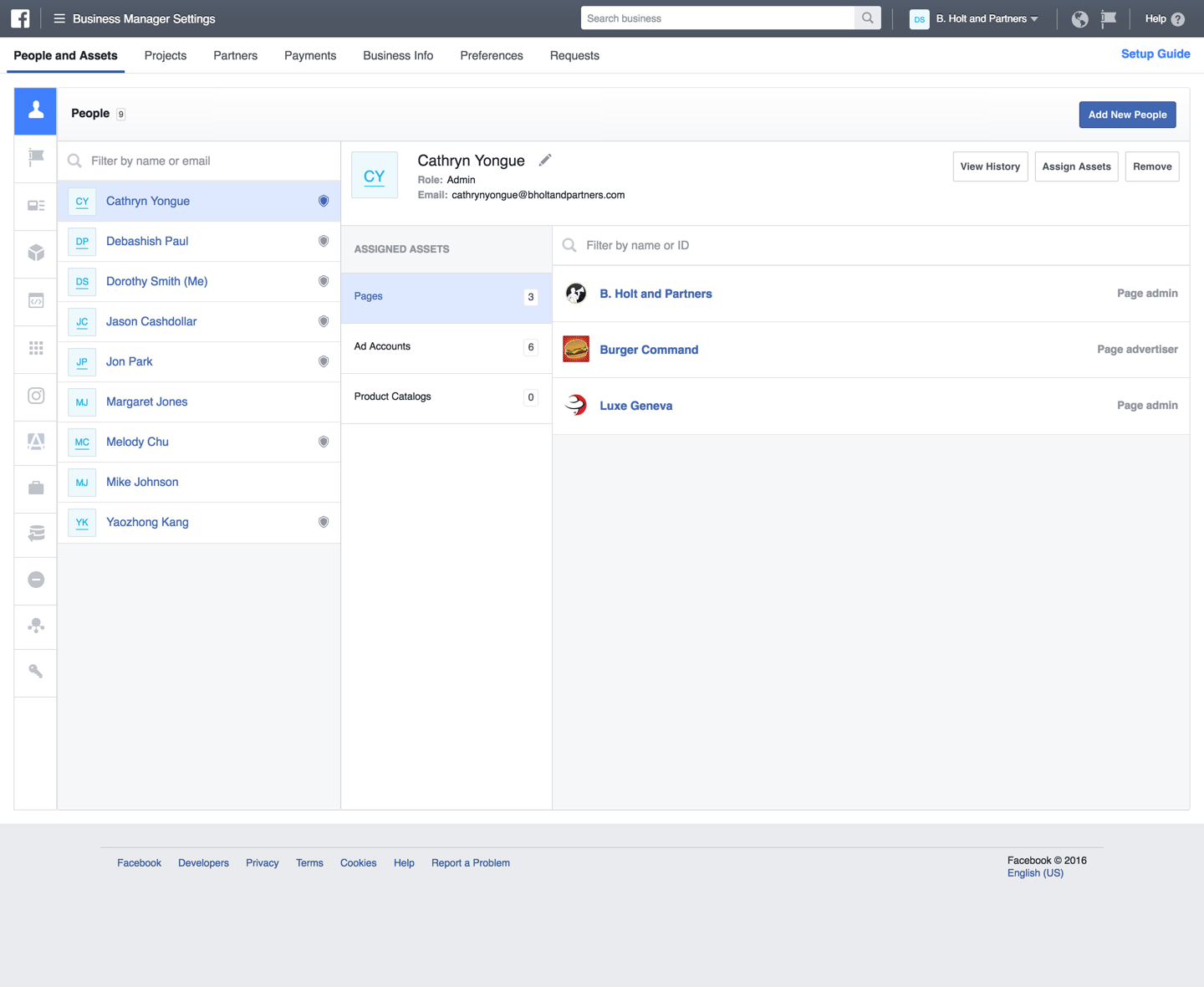
As a Facebook ads specialist, you’ll need to know how to connect business pages, Instagram accounts, and ad accounts, and how to control access for different people.
You can add team members and clients so that you can collaborate inside the system. Each person is assigned a permission level that determines what they can see and what actions they can take.
Other parts of Meta Business Suite you’ll use include:
- The content calendar for scheduling posts
- Product catalogs for shops and catalog ads
- The Inbox, to communicate with users through Messenger and Instagram Direct
3. Understand how Facebook sales funnels work
Similar to other forms of digital marketing, sales funnels play an important role in Facebook advertising.
People are unlikely to buy from your business on the first interaction. Therefore, it is necessary to guide them through the purchasing journey.
Funnels divide users into various stages based on their current relationship with your business.
People who engage with your business for the first time are at the top of the funnel. The more people engage with your business, the further down the funnel they go until eventually becoming a customer.
Facebook sales funnels use the following stages to guide an individual from prospect to customer:
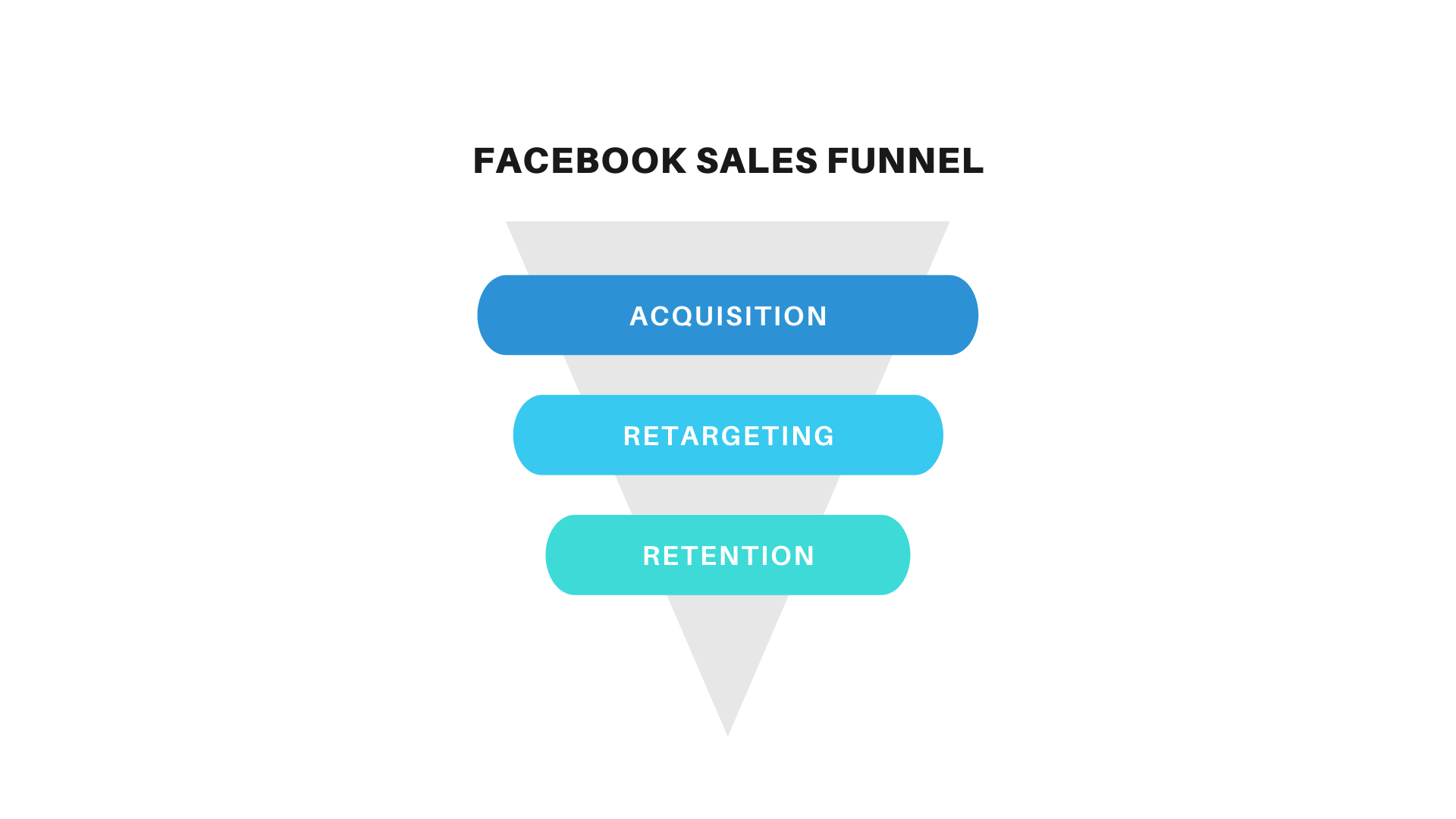
Acquisition - During this stage, you find new audiences to target with your campaigns. You then use your ads and content to warm them up for the later funnel stages.
Retargeting - During this stage, you market to people who have moved through the acquisition stage but have not resulted in a sale. This can include people who saw your ad but took no action or who clicked through to your website before eventually leaving. This stage aims to generate more sales with less marketing spend than the previous stage. Learn how to set it up in our Facebook retargeting tutorial.
Retention - During this stage, you use your ads to target existing customers. Already having data on this audience, you are able to promote highly targeted offers.
4. Set up the Meta Pixel, events, and custom conversions
Facebook advertising experts must know how to set up tracking properly. Without accurate tracking, Meta can’t optimize your campaigns and you can’t prove their results.
The Meta Pixel (formerly the Facebook Pixel) is a piece of tracking code added to your website. It records what visitors do on your site, such as viewing a product or making a purchase, and reports it back to Meta. This lets you calculate conversions and revenue from your ads and build retargeting audiences.
The Conversions API sends the same events directly from your website’s server to Meta. Because it doesn’t depend on the visitor’s browser, it recovers conversions the pixel misses due to ad blockers and privacy settings. Meta recommends using both together.
Below are some of the standard events you can track:
- Add payment info
- Add to cart
- Add to wishlist
- Contact
- Complete registration
- Initiate checkout
- Lead
- Purchase
- Search
- View content
You'll need to know how to create a custom event to track an action that isn’t part of the standard events.
You can configure your custom events to add users to custom audiences automatically. However, you cannot use custom events for optimization or attribution unless the event is mapped to a custom conversion.
To create a custom conversion, go to Events Manager, open Custom Conversions, and click Create a Custom Conversion. Add a name and select a data source, which will be your pixel unless you are tracking an offline event.
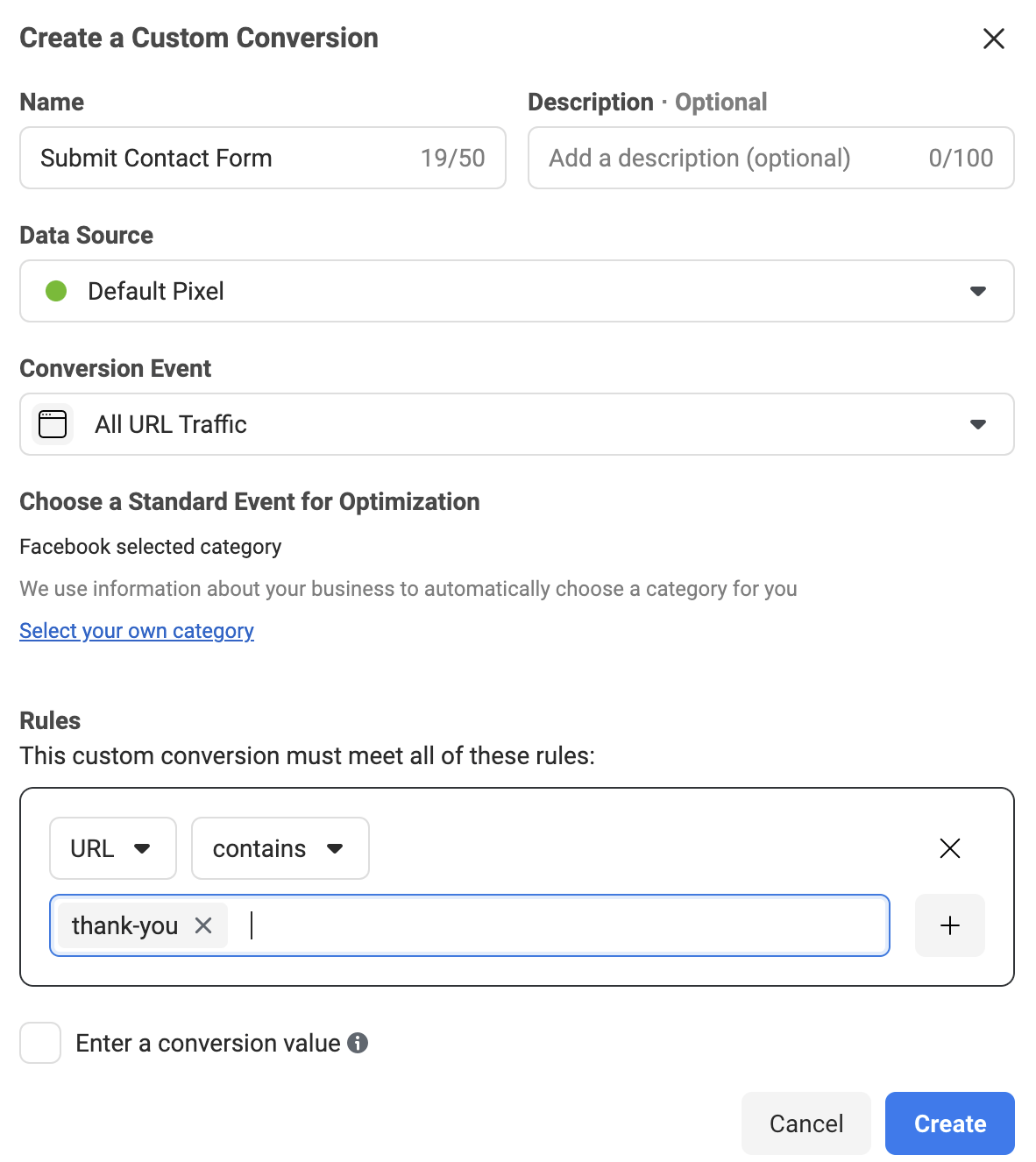
You’ll then need to select the conversion event that you are looking to track. This can be any of the standard events, or it could be a custom event.
5. Understand custom, lookalike, and broad audiences
Meta gives advertisers many options for defining the audience for an ad campaign. You can target people based on location, age, gender, interests, and more.
You’ll need to understand three types of audiences.
Custom audiences
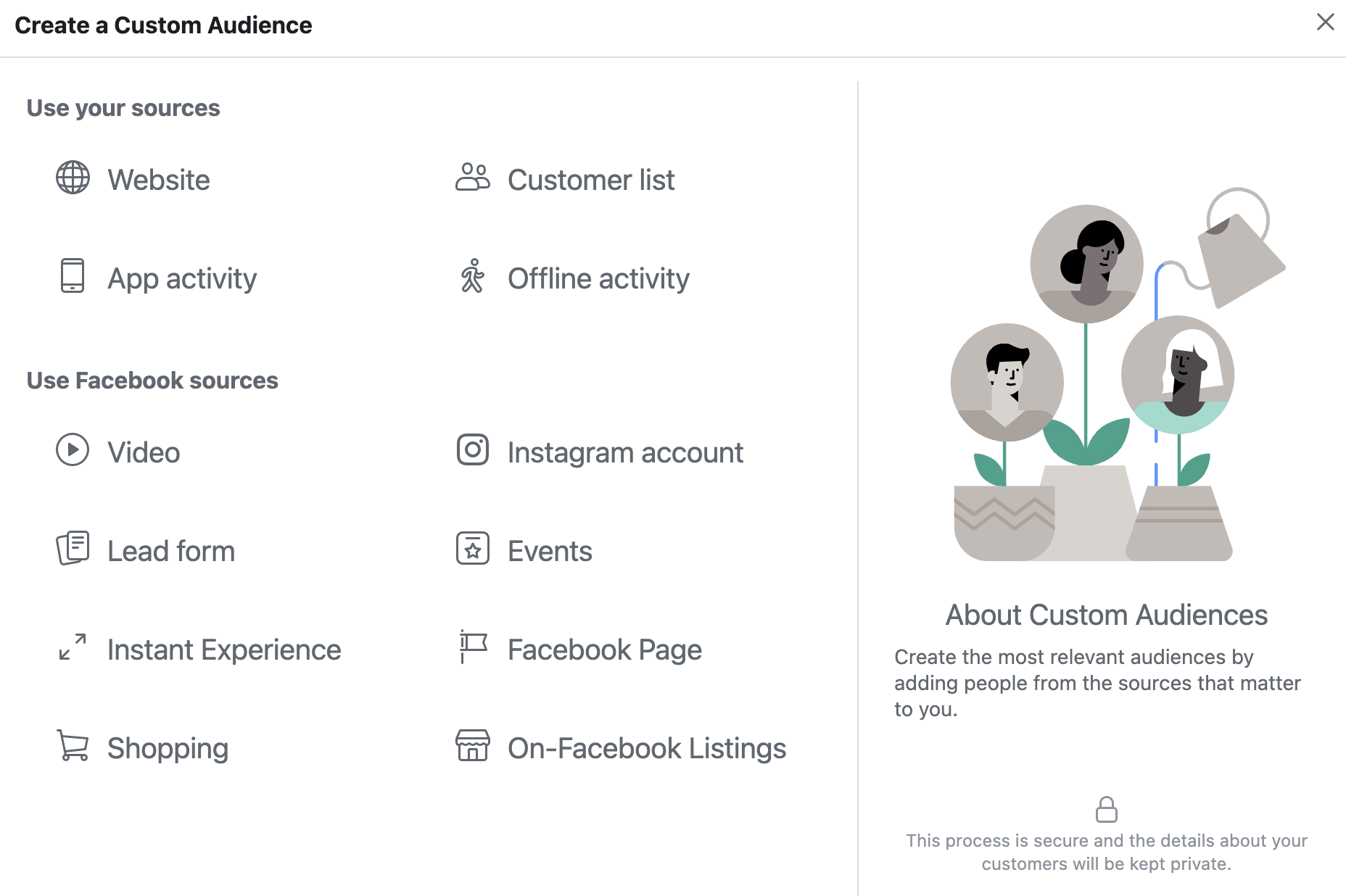
With a custom audience, you can create a precise list of people to target with your ads. You can use several different data sources to create your custom audiences, including:
- Website visitors: You can add all website visitors or you can define particular segments of your visitors, such as people who visit a certain page or people who visit multiple pages.
- Customer list: You can upload a list of email addresses for previous customers. Meta will match the emails to user accounts to know who to target for ads.
- Engagement: You can add anyone who engages with your business on Facebook or Instagram (comments, likes, video views, etc.) to a custom audience.
Lookalike audiences
Lookalike audiences give you the ability to market to a large base of users who share similarities with your best customers.
You create a lookalike audience from a source audience, such as a list of previous customers or website visitors. Meta uses machine learning to find other users with similar characteristics and adds them to your lookalike audience.
Broad and Advantage+ audiences
Meta’s delivery system has become very good at finding buyers on its own. With broad targeting, you set only basic limits like location and age and let Meta’s AI decide who sees your ads, using your creative and your conversion data as signals. Advantage+ audience works the same way, treating any audience you suggest as a starting point rather than a hard limit.
A good Facebook ads specialist knows when to rely on the algorithm and when a tightly defined custom audience will perform better. The only way to find out is to test.
6. Study the different ad placements and ad formats
Facebook ads can appear in many places across Meta’s apps.
When you create a campaign, you can let Meta choose placements for you by selecting Advantage+ placements, which Meta recommends for most campaigns.
If you want to choose your ad placements yourself, you select Manual placements in the ad set settings. You can then choose to enable or disable the following platforms:
- Messenger
- Audience Network
Within each platform is a list of specific placements you can choose to enable or disable. Some of the options include:
- Facebook Feed
- Instagram Feed
- Facebook and Instagram Stories
- Facebook and Instagram Reels
- Facebook Right Column
- Messenger Inbox
Along with placements, you’ll also need to understand the different ad formats.
Here are the most important types of Facebook ads you’ll need to know how to use:
Image ads - This is the simplest form of Facebook ad and contains an image, headline, description, link, and call to action button. You can use image ads for almost all placements.
Video ads - With this ad format, you can showcase your product or service using a short-form video. Video ads can appear in Feeds, Stories, and Reels, and each placement allows for different video lengths and aspect ratios. As a Facebook ads expert, you’ll need to know how to make videos that capture people’s attention quickly, especially vertical videos for Reels and Stories.
Carousel ads - This ad format allows you to show up to 10 images or videos in the same ad. Each card has its own link and headline. Users can scroll the cards by swiping on their phones or clicking the arrows on a desktop. These ads are a great choice when you want to showcase multiple products or different features for the same item.
Collection ads - These ads were designed specifically for mobile users. They contain a cover image (or video) followed by multiple products. When someone taps on the ad, it becomes full screen, and they can scroll through more products.
Advantage+ catalog ads - Formerly known as dynamic product ads, these ads are used to show people products from your catalog based on their interests, including products they viewed on your website. Once you set up the campaign, the ads are generated automatically.
You should also know how to use the Meta Ad Library, a public database of all the ads currently running across Meta’s apps.
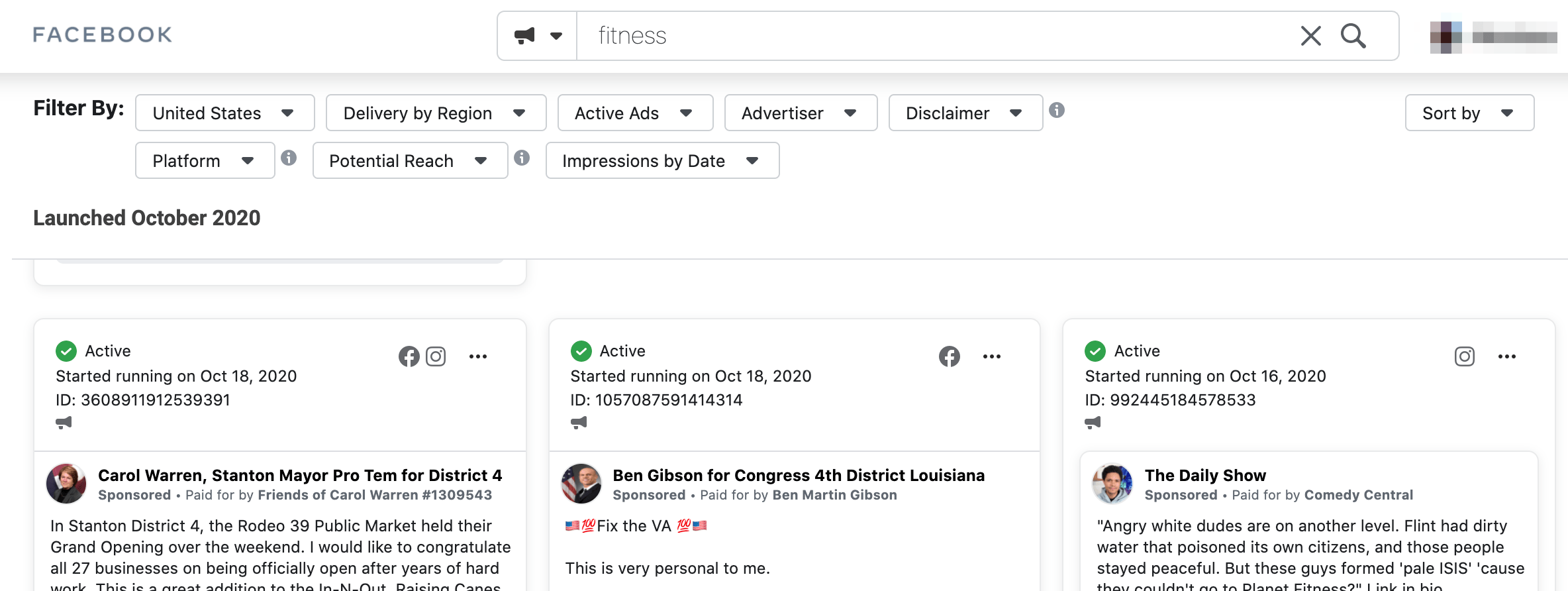
You can use the Ad Library to see exactly what ads a competitor is running, including the creative, the copy, and when the campaign started. It’s one of the best ways to learn which formats and angles work in a particular industry.
7. Learn how to create ad creatives
Facebook ads specialists need to know how to create ad creatives, or at least how to brief a designer.
Visuals are the core of Facebook ads, as every ad format needs an image or video. The creative also does much of the targeting work today: with broad audiences, Meta uses your creative to work out who to show the ad to.
You can save your images and design elements in a single place. This allows you to work more efficiently as you can simply reuse these elements as needed.
There are plenty of design tools that are easy to learn. Some popular choices include:
- Canva
- VistaCreate (formerly Crello)
- CapCut, for short-form video
Meta’s Advantage+ creative options can also automatically adjust your images and videos for different placements, such as cropping them to fit Stories and Reels.
Just as important is testing. Get into the habit of running several creative variations at once and keeping the ones that perform best.
8. Practice with your own small-budget campaigns
You can’t learn Facebook ads from courses alone. Sooner or later, you need to spend real money and see what happens.
The easiest way to start is with your own project:
- Create a Facebook page for a blog, a hobby, or a small product you want to sell.
- Install the Meta Pixel on a simple website or landing page.
- Run a campaign with a small daily budget and a clear objective, such as leads or sales.
- Test different audiences, creatives, and ad copy, and compare the results.
Even a modest budget teaches you things no course can: how the learning phase works, how costs change as you edit a campaign, and why some ads take off while others never spend.
Keep screenshots and notes of every test. They will become the raw material for your portfolio.
9. Learn how to use Ads Manager reporting
Ads Manager reports give you all the information you need to monitor the performance of your campaigns.
As a Facebook advertising expert, you need to know how to analyze the data to see where you are succeeding and where you need to improve.
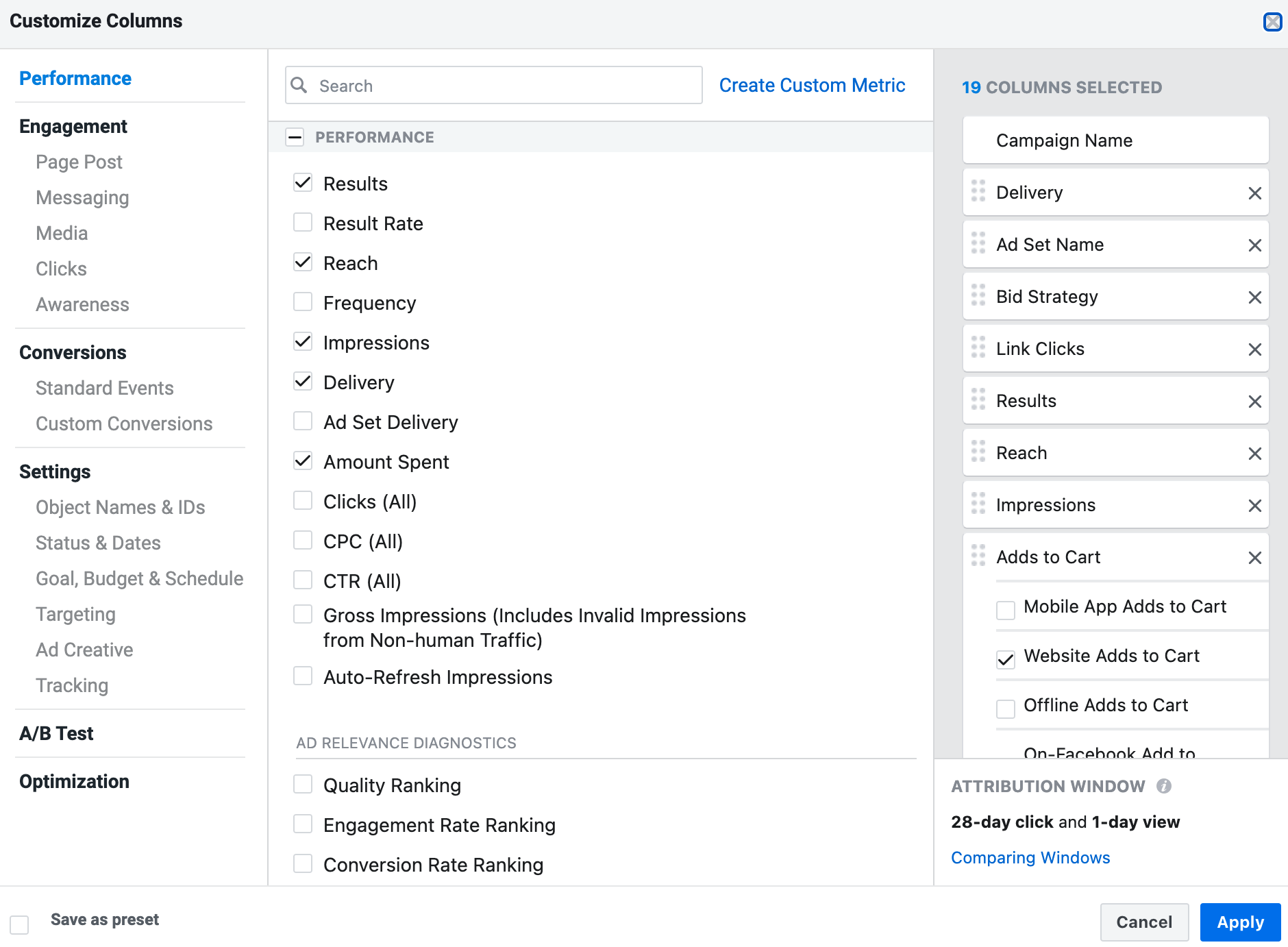
You can customize the reports to include the metrics most meaningful to your business.
Here are some of the most important metrics to track in your reports:
- Return on ad spend (ROAS): The revenue generated for every dollar spent on ads. This is the number most e-commerce clients care about.
- Cost per result (CPA): How much you pay for each purchase, lead, or other conversion.
- Click-through rate: The percentage of people who click the ad after seeing it.
- Link clicks: The total number of times people click on links in your ad.
- Amount spent: The campaign’s total cost.
- Impressions: The total number of times your ad is viewed.
- Reach: The number of people who have seen your ads.
- CPC: The average amount paid each time someone clicks on your ad.
After you’ve created a report, you can export the data to use outside of Ads Manager.
You can also automate the process of generating reports by scheduling them to be sent to your email at recurring intervals.
10. Build a portfolio and find your first clients
Clients and employers hiring a Facebook ads specialist want proof that you can get results. A portfolio of case studies is the best way to show it.
For every campaign you run, write a short case study with before-and-after numbers: the goal, the budget, what you did, and the results, such as a lower cost per lead or more sales. Screenshots from Ads Manager make the results credible.
If you don’t have clients yet, here is how to get your first ones:
- Offer free or discounted work to a local business in exchange for a testimonial and permission to share the results.
- Start freelancing on platforms like Upwork and Fiverr, beginning with small projects. Our guide to freelance digital marketing explains how to get started.
- Apply for entry-level roles such as paid social coordinator, junior media buyer, or digital marketing assistant. See our list of entry-level digital marketing jobs.
Once you’re working, keep learning. Meta changes its advertising platform all the time, and what worked last year may not work today.
You can sign up for the Meta for Business newsletter for free to receive updates directly to your inbox, and follow top websites related to Facebook marketing.
Here are some quality sites worth checking out:
Facebook Ads Specialist FAQ
Is a Facebook ads specialist the same as a Meta ads specialist?
Yes. Facebook’s parent company renamed itself Meta in 2021, and its advertising platform now covers Facebook, Instagram, Messenger, and the Audience Network. Job listings use both titles for the same role, along with “paid social specialist” and “media buyer”.
Do you need a degree to become a Facebook ads specialist?
No. Some job listings ask for a degree in marketing or business, but most clients and many employers care more about results. Certifications and a portfolio of case studies are usually enough to get started, especially as a freelancer.
Are Meta certifications free?
Meta’s preparation courses and study guides are free. The certification exams themselves have a fee. The Meta Social Media Marketing Professional Certificate on Coursera is included with a Coursera subscription.
Should you freelance or get a job first?
Both work. A job at an agency gives you access to bigger budgets and experienced colleagues, which speeds up learning. Freelancing gives you more freedom but you have to find clients yourself. Many specialists start at an agency and go freelance later.
Key Learnings
Facebook and Instagram advertising is an effective marketing channel for businesses across industries.
Running successful campaigns requires extensive knowledge and skills, which is why companies hire Facebook ads specialists.
Facebook ads specialists have a range of responsibilities, including:
- Planning campaigns in Meta Ads Manager
- Creating ad creatives and ad copy
- Setting up tracking with the Meta Pixel and Conversions API
- Analyzing campaign performance and making optimizations
To become one, learn the platform, get certified, practice with your own campaigns, and build a portfolio that proves you can get results.