




To write an SEO-friendly blog post, choose one main keyword, check what already ranks for it, plan a clear structure, and write for readers first: answer the question directly under each heading, use the keyword naturally in your title, URL, headings and first paragraph, link to related pages and trusted sources, and keep the post fast and easy to read on mobile.
Writing optimized blog posts for both search engines and users is a skill, and like any other skill, it improves with practice. It's not a complicated process, and it now also helps your content get picked up by AI search tools like Google's AI Overviews and ChatGPT.
In this post, you'll learn the 10-step process I follow to SEO optimize all my blog posts, with a checklist at the end.
10 Tips For Writing SEO-Friendly Blog Posts
- Think Before You Start Writing
- Do Your Keyword Research
- Create The Blog Post Structure
- Craft The Page Title And URL
- Optimize Your Headings
- Add Links When It Makes Sense
- Use Keywords Strategically In Your Content
- Optimize The Meta Description
- Improve On-Page SEO
- Update Your Blog Regularly
1. Think Before You Start Writing
Any time you spend in the beginning thinking about what to write in your blog post, it’s time that you will save later in the process.
This is what I do: On a daily basis, I read articles about SEO and marketing from industry blogs and news sites.
When I find a title or topic that is interesting and a candidate for one of my future blogs, I copy the URL and title to my notes.
At the beginning of each month, I create my publishing schedule. Among other sources, I also look into my notes and review all saved articles.

After I decide which topics to cover, I set a publishing date for each topic in a Google calendar.
When it’s time to write the post, I take the topic and do a more detailed analysis to answer these questions:
- What specific topics will be covered in the blog post?
- What is the goal of the post (to get better rankings for a keyword, to get more subscribers, to promote my SEO Courses, etc.)
- Who is the post for, and how will it benefit those readers?
Answering these questions in advance makes moving on to the next steps easier.
2. Do Your Keyword Research
When it's time to write a post, the first step is to find which keywords your blog post will target with keyword research. This ensures that your content aligns with what your audience is searching for. There are two easy ways to do this:
If you already have a keyword in mind, perform a Google search and examine the top three ranking pages for that keyword. Analyze these pages using a keyword tool to identify the exact keywords they rank for.
If you're starting without a specific keyword, use a keyword research tool to get ideas. Begin by entering a broad topic related to your content. The tool will provide a list of relevant keywords, including long-tail variations.
Look for keywords with a balance of high search volume and low competition.
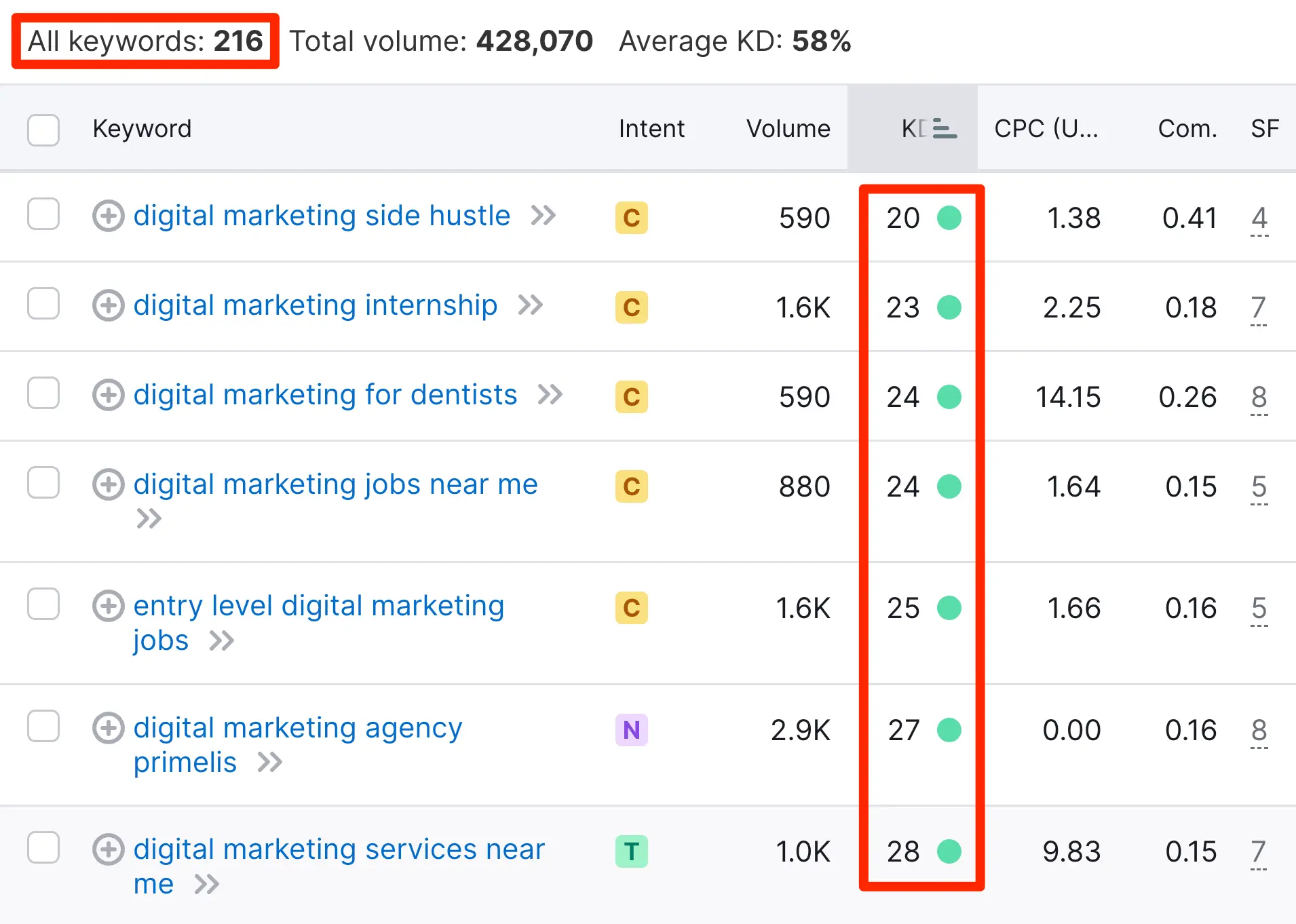
Remember, the goal is not just to find any keywords but those that your target audience is actually searching for.
Also, consider the intent behind the keywords: are people looking for information, a specific product, or a solution to a problem? Writing blog posts that satisfy the search intent can significantly improve your SEO performance. Read the top-ranking articles for your keyword to see what information readers expect, then plan to cover it better.
3. Create The Blog Post Structure
The next step is to write down the structure of your blog post. By structure, I mean to define the different parts of the post.
Splitting a blog post into various parts can make writing easier. Writing 200 words to cover a specific part of the post is faster and more efficient than writing larger sections.
HINT: This is particularly useful when you don’t have the time to finish the post in one sitting. Once the structure is ready, you can work on the different parts independently without needing much time to re-generate your focus and organize your thoughts.
For example, before writing the blog post you are reading now, I created the structure which looked like this:
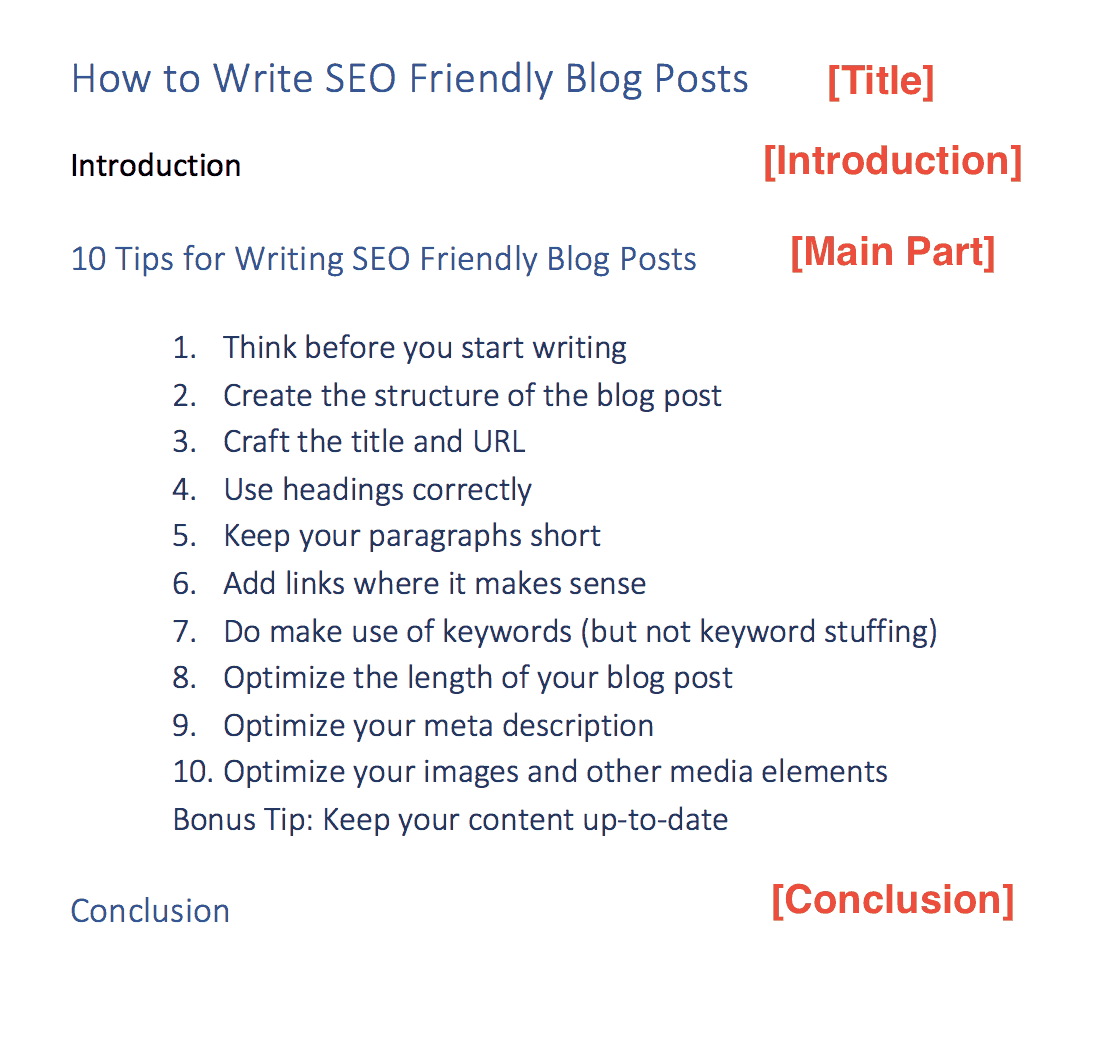
Generally, a blog post should have an introduction, main part, and conclusion (similar to writing an essay).
The main section can then be broken down into several parts. Look at the structure of this post again and scroll up and down the page to see the result.
Notice how I divided the main section of the post (10 Tips for Writing SEO Friendly Blog Post) into different parts.
Write for readers and AI search
Search engines and AI search engines pull answers from pages that are easy to understand. When you write each section:
- Answer first: start each section with a direct answer to the question in its heading, then add the details.
- Keep paragraphs short: two to three sentences each, so the post is easy to scan on mobile.
- Use lists and tables for steps, comparisons and key facts.
- Show your experience: add your own examples, results and screenshots. First-hand experience makes content more trustworthy than a summary of other articles.
If you're new to writing for the web, our guide to content writing covers the basics.
4. Craft The Page Title And URL
The next step is to decide on the title of your blog post and the URL.
I know some bloggers prefer to do this step first and then create the blog structure, but it’s easier to come up with the title once you have a good idea of what the post will cover.
If you feel that you need to work on the title first and then the blog structure, by all means, follow what is more efficient for your case.
Page Title Tag
Writing a good and interesting title is a very important step for SEO purposes and user-friendliness.
An optimized title is essential for SEO because it gives Search Engines a big hint about what the page is about.
A good title should have the following characteristics:
- It is around 50-60 characters long, so it usually isn't cut off in the search results (Google truncates titles by pixel width, not by a fixed number of characters).
- It includes your target keyword (but not keyword-stuffed)
- It accurately describes the content of the blog post
- It is enticing to make users click on it when displayed on the search engine results pages.
Take, for example, the title of this post. My target keyword was 'SEO-friendly blog posts,' instead of just creating a title with that keyword alone, I added the ‘How to’ and the '(10 Steps)' to make it clear to search engines and users what to expect in the content.
Here is another example for the keyword 'learn digital marketing'.

URL Optimization
When it comes to the URL, the rules are simple:
- Use hyphens (-) to separate the words that make up a URL. If this is not the case for your blog and you are on WordPress, you must change your permalink structure.
- Consider making your URLs shorter by removing unnecessary words. Usually, the URL is auto-generated by your CMS based on the title. What you can do (before publishing a blog post the first time) is to manually change the permalink (URL) and remove some of the words.
For example, the default URL for this blog post was /how-to-write-SEO-friendly-blog-posts-10-steps/, but I have optimized it by changing it to /seo-friendly-blog-posts/.
5. Optimize Your Headings
A well-optimized blog post follows these rules when it comes to headings:
There is only one h1 tag on the page: which is usually the same as the <title> of the post, although it doesn’t have to be the same.
What is important is to have only one h1 tag and that heading to include your target keywords.
Use headings in a hierarchical mode: The post's title is the h1 tag, the main sections should have an h2, and the subsections should have an h3.
So, the order of the tags should be H1->H2->H3.
When you create a good blog structure, getting the headings right is easy. Look at the screenshot below, which shows how I used headings for this blog post.
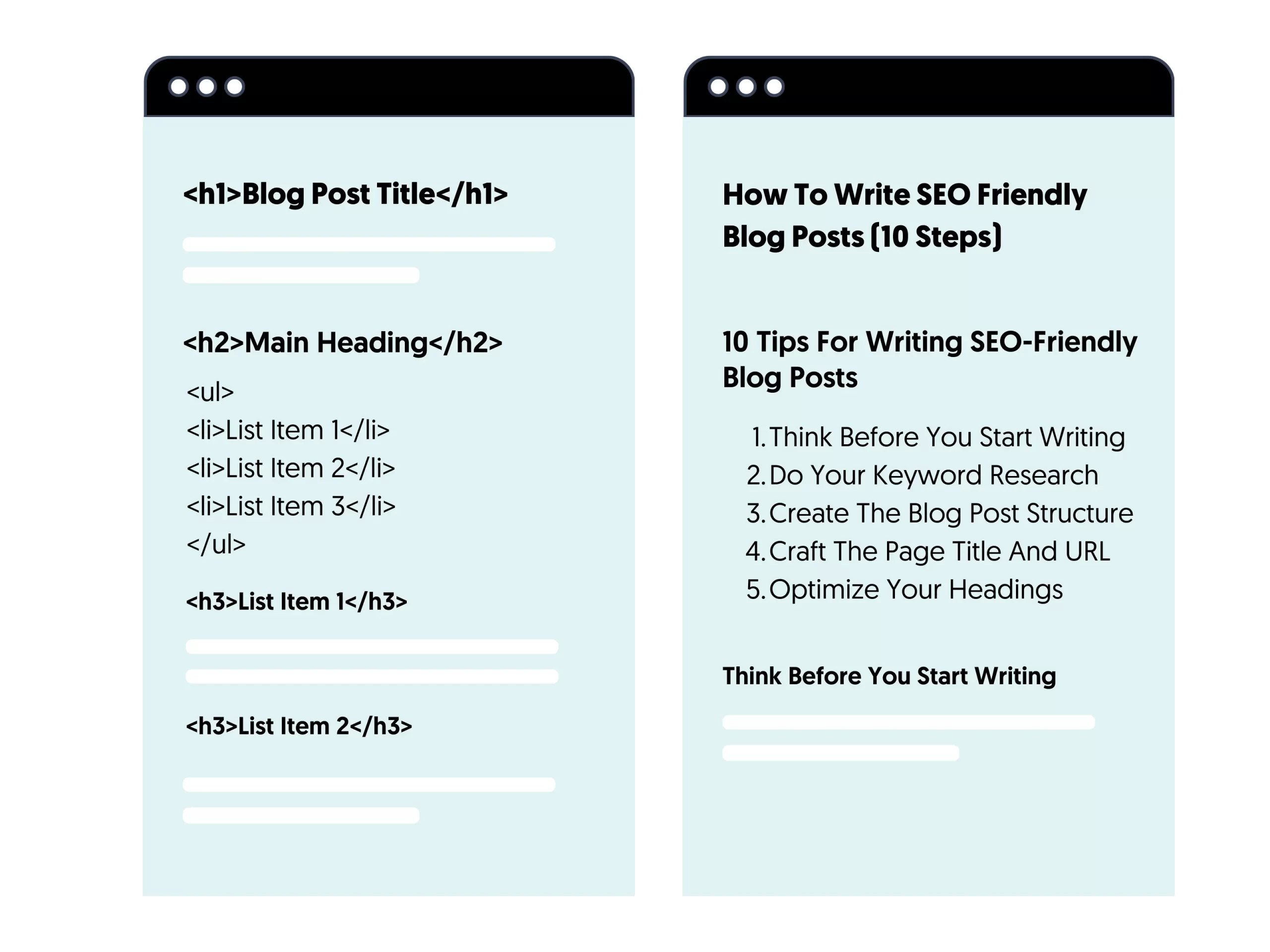
You should have your content organized in this structural way because It helps search engine spiders during the crawling process and makes the blog post easier to read (and scan) for users.
Resources to learn more
- H1 Tag: Everything you need to know about H1 tags and headings.
- Page title Vs H1 Tag: The difference between a title and an H1 Tag for SEO.
6. Add Links When It Makes Sense
Whenever you write a new piece, try to ‘associate it’ with already published blog posts by adding internal links.
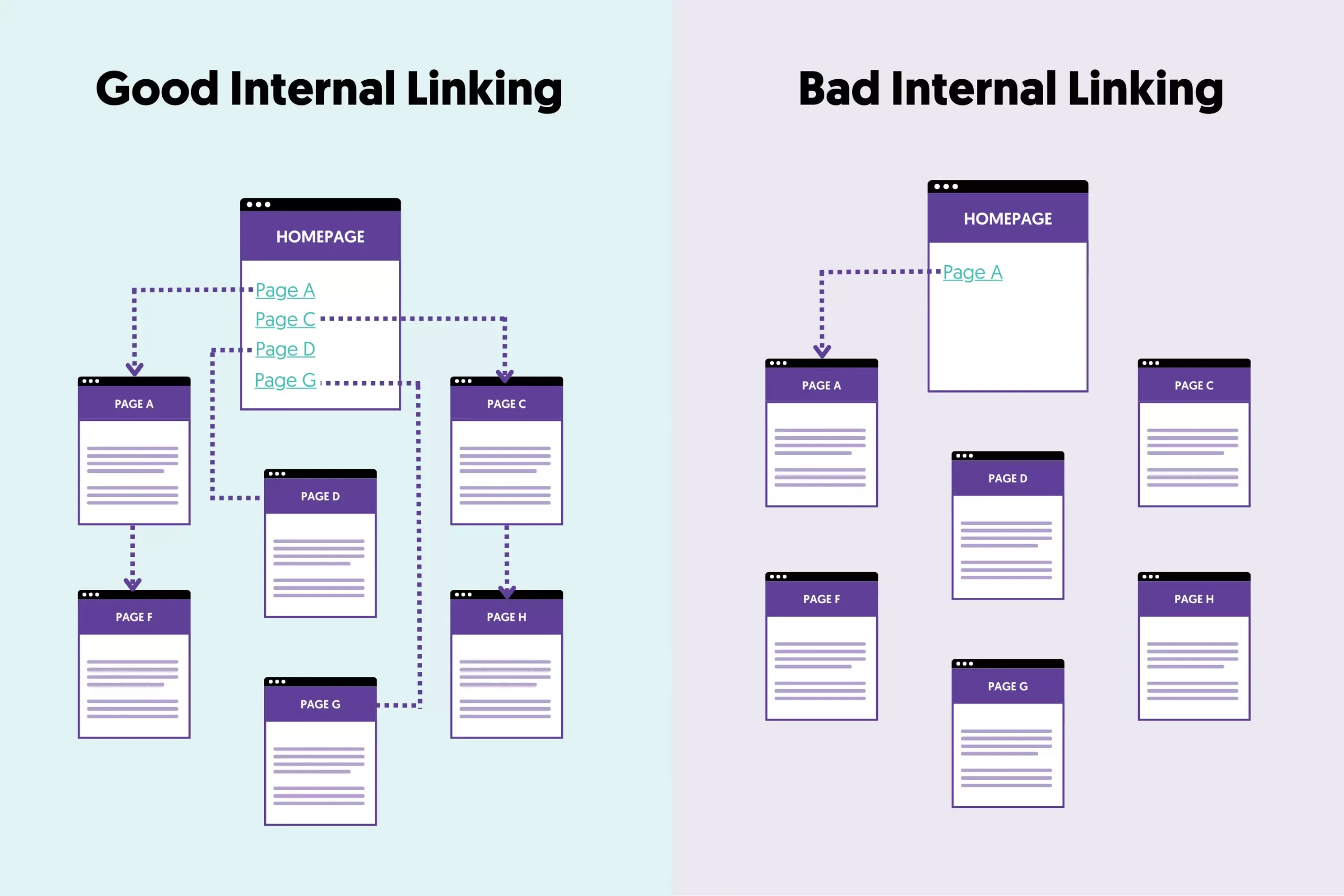
Internal linking is a very effective and easy-to-follow SEO technique that has many benefits:
- It helps search engines discover new pages on your website: when crawling a page, search engine spiders will follow any link (that doesn’t have the nofollow attribute) and add it to their index (if it does not exist).
- It’s another way to give search engines a big hint on what a page is about. For example, when I add a link like this: SEO Checklist, I’m telling the crawler what the linking page has to do with the SEO checklist.
- It’s a great way for users to click a link and read more about a topic.
- It keeps readers engaged and on your website for longer.
Use descriptive anchor text that tells readers and search engines what the linked page is about. Keywords are fine when they read naturally; just don't stuff them.
Link out to trusted sources too. When you mention a statistic, a study or an official guideline, link to the original source. It helps readers verify your claims and shows that your content is well researched.
7. Use Keywords Strategically In Your Content
Having your target keywords (and variations) in your blog posts will not get you into trouble. It is recommended to do so.
What is not recommended is keyword stuffing.
In other words, don’t add keywords in the text for the sake of doing so, but do it only when it’s natural to read.
Where should you add keywords? I get this question a lot, and the answer is simple:
- In the title of the post
- In the URL
- In the first paragraph
- In the main headings of your post
- Within the context of the post
- In the 'conclusion'
Here is a hint for you
To avoid keyword stuffing and repeating the same keyword repeatedly, go to Google Keyword Planner or Semrush and search for your primary keyword.
These tools will give you a list of keywords closely related to your primary keyword. Make sure that you mention some of those keywords in your blog post.

8. Optimize The Meta Description
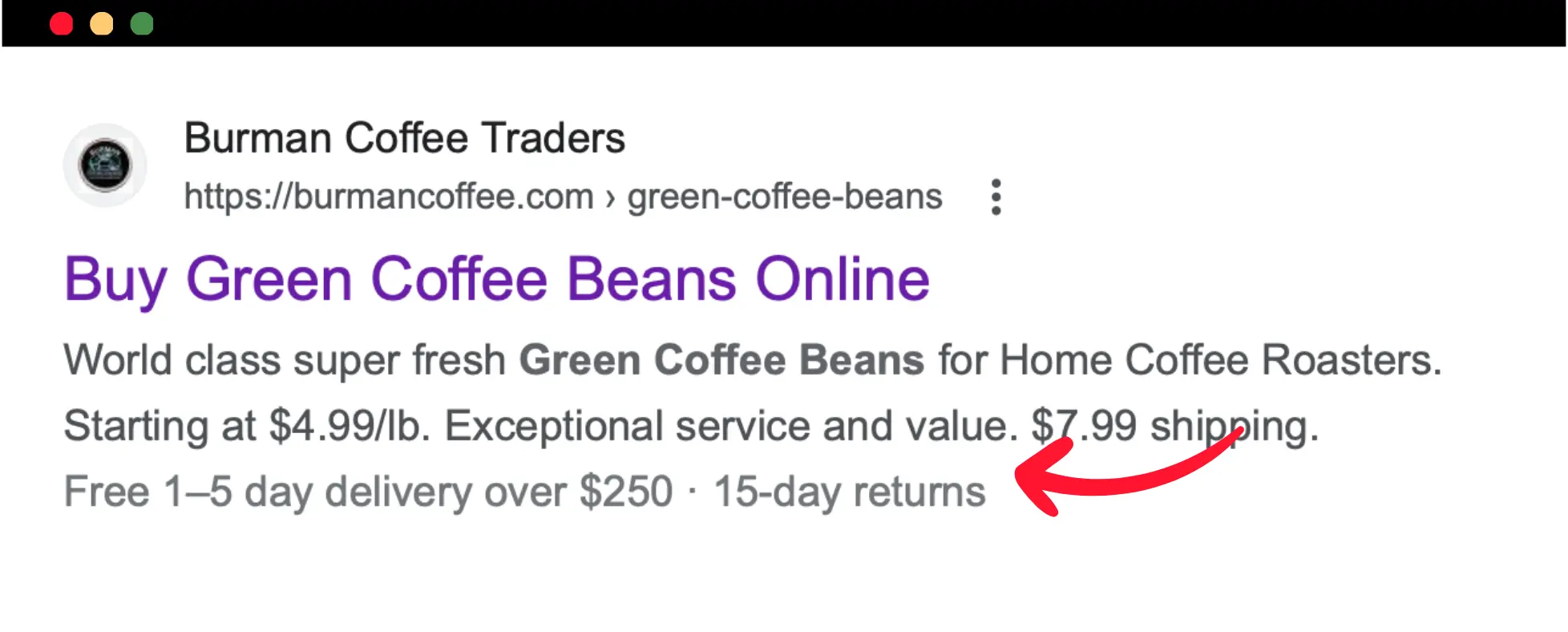
The meta description tag summarizes the post in less than 160 characters. Google may choose to show your description in the results, so it has to be informative and interesting to encourage users to click your link and visit your blog.
Here is an example of an optimized meta description:
9. Improve On-Page SEO
You need to work on your on-page SEO to increase your chances of higher ranking. The most important elements to optimize are:
Page Speed
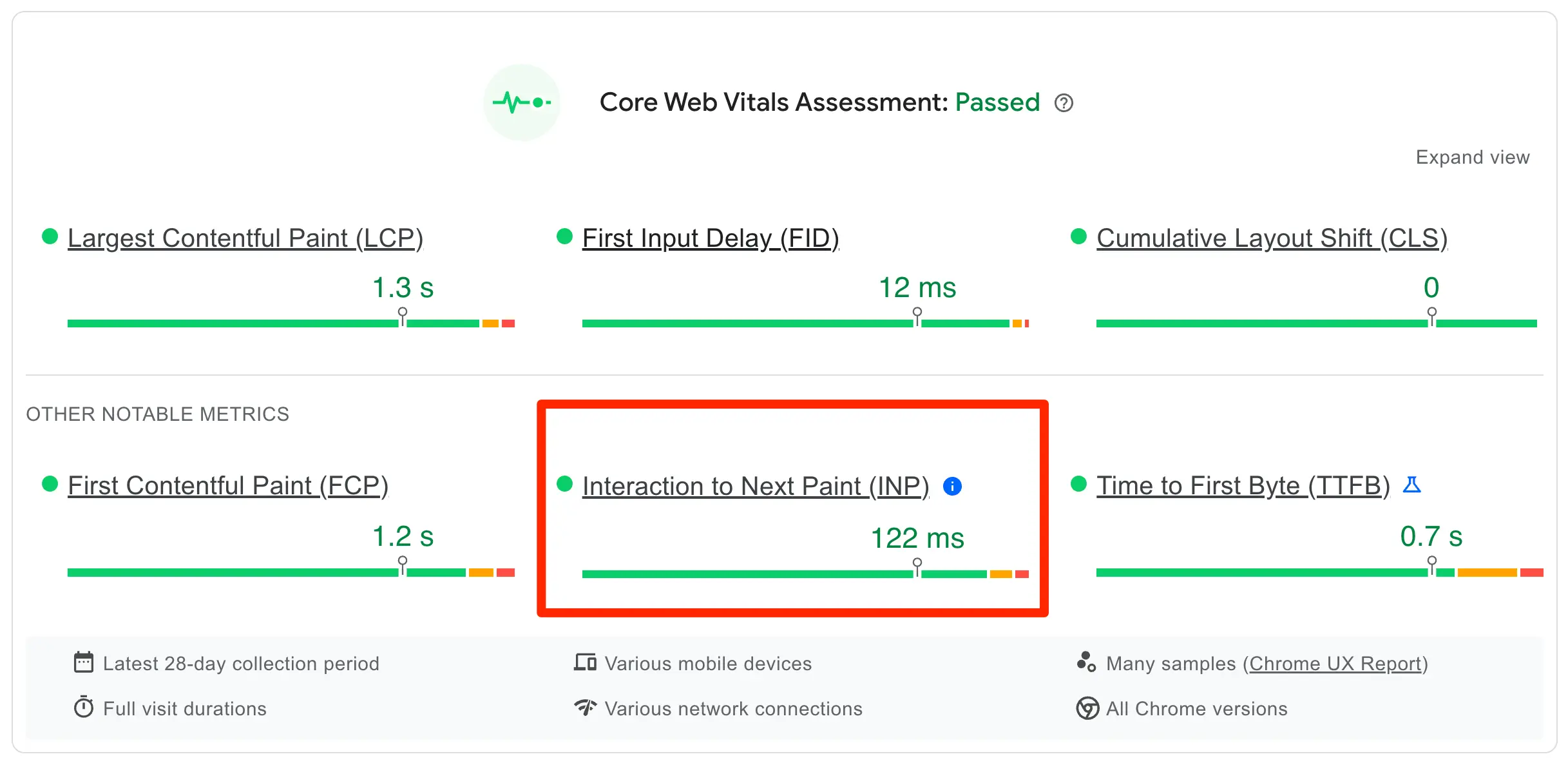
Your main content should load fast: Google's Core Web Vitals consider a Largest Contentful Paint of 2.5 seconds or less as good. Core Web Vitals are part of the page experience signals Google uses.
As a first step, use Google Page Speed Insights to analyze your blog's performance and follow the recommendations to improve your page speed score and core web vitals values.
Mobile Friendliness and Page Experience
Google is using mobile-first indexing. This means it uses the mobile version of a webpage for indexing and ranking purposes.
What does this mean to you?
- You must ensure that your website is mobile-friendly.
- Content can be viewed on all devices without problems.
- You use a big font and a good contrast ratio.
- Ads are easily distinguishable from the main content.
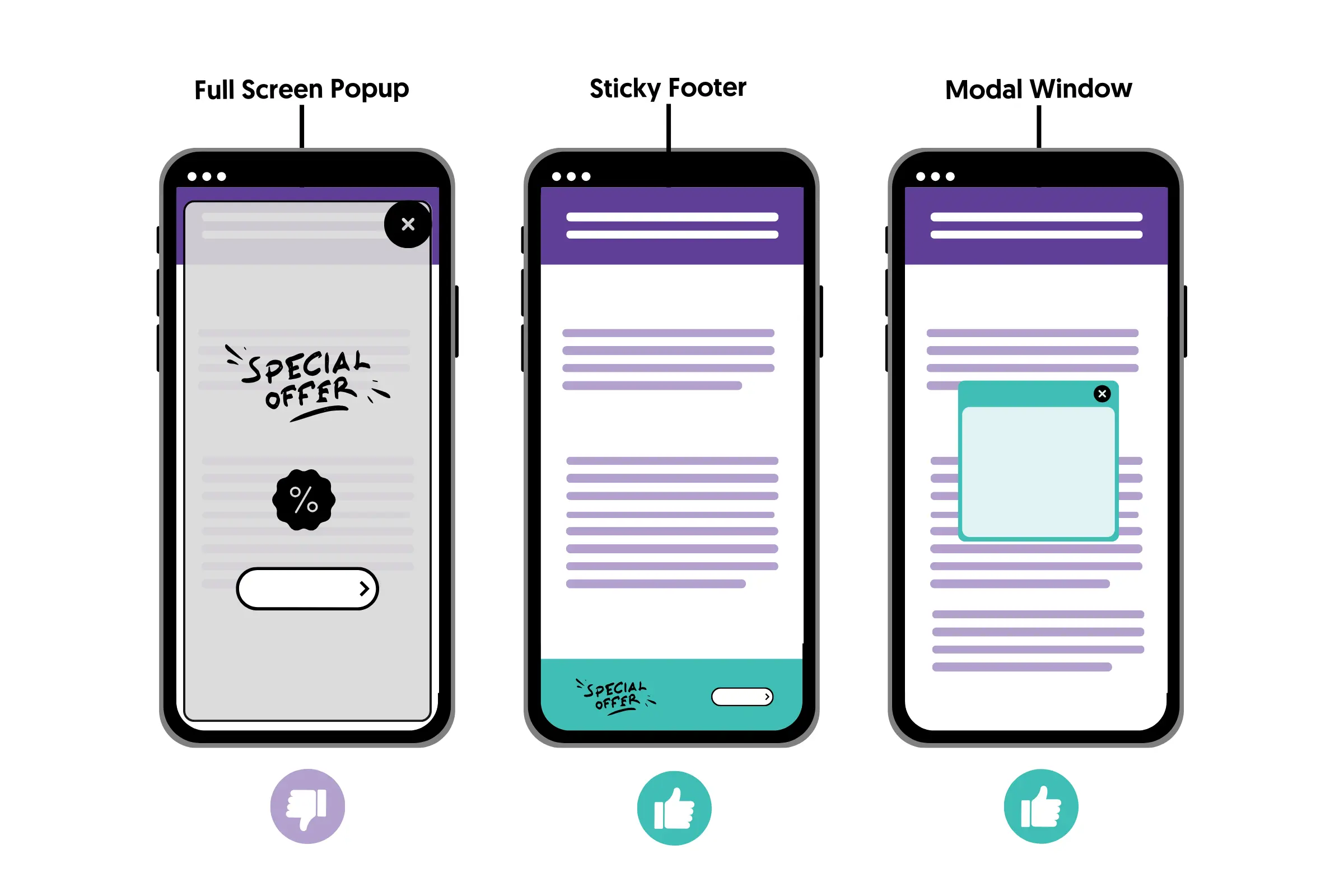
- You don't have any intrusive interstitials.
Blog Post Length
There is no ideal word count for SEO. What matters is the quality of the content, not the quantity: a post should be as long as it needs to be to answer the reader's question completely.
You should understand that when writing a blog post for a particular topic, you compete with hundreds of other posts published about the same subject. Your goal is to make your blog post better.
The best way to find out how long to make your blog posts is to open Google, search for your target keywords, and examine the results. Open all ten entries on the first page and take note of the number of words and types of content they provide.
Aim to publish a better piece in all aspects (word length, formatting, quality of information). Hit the publish button and then use all available white hat methods to drive traffic to your blog.
Images
Images, graphs, infographics, videos, statistics, and other media elements make a blog post more interesting to read and enhance the quality of the content.
Google uses the alt text, the page content and computer vision to understand what an image shows, so help it with meaningful file names and descriptive alt text. Many websites still skip this simple step.

10. Update Your Blog Regularly
Many people are asking in various forums, “How often should I update my blog?” and “Is content freshness a ranking factor?” and I can understand why.
It would be great if someone told you that you don’t have to update your blog regularly; that would make things a lot easier for all of us, but unfortunately, that’s not the case.
You need to have fresh content on your blog for several reasons.
- It’s another incentive for users to come back to your blog.
- It’s a great ‘excuse’ to contact your subscribers.
- It’s one of the ways to stay in synch or bypass your competitors.
- It will help you improve your writing skills
- It can generate more page views
SEO-Friendly Blog Post Checklist
Use this checklist before you hit publish:
- The post has one main keyword that matches what your readers search for.
- You checked the top-ranking pages and cover the topic better.
- The title is around 50-60 characters and includes the keyword.
- The URL is short, uses hyphens and includes the keyword.
- There is one H1, with H2 and H3 headings in a logical order.
- The first paragraph answers the main question and uses the keyword.
- Each section starts with a direct answer, and paragraphs are short.
- The post links to related pages on your site and to trusted sources.
- The meta description summarizes the post in about 160 characters.
- Images have meaningful file names and descriptive alt text.
- The page loads fast and reads well on mobile.
Conclusion
The takeaway lesson from this blog post is the following:
Before starting a new post, spend some time doing your research and have a clear mind about what to write about and what you want to achieve.
Follow the guidelines explained above to write SEO-friendly blog posts, and if you have existing blog posts that are not optimized, allocate some time to go back and make the necessary changes.
Create a publishing schedule you can follow and stick to for a long time.
If you have started learning SEO, don’t lose hope. The results in the first months may not be so good, but keep publishing high-quality, optimized content, and the traffic will eventually flow in.
FAQ
Is SEO dead now with AI?
No. AI search tools like Google's AI Overviews and ChatGPT still rely on web pages to build their answers, and they favor clear, trustworthy content. Writing SEO-friendly blog posts now helps you rank in Google and get cited by AI tools.
How long should an SEO blog post be?
There is no ideal length. Look at the pages that rank for your keyword to see how deep they go, then write as much as you need to answer the question completely, and no more.
How many keywords should a blog post target?
Target one main keyword per post and use related keywords and variations naturally. Each important keyword should have one page on your site, so your own posts don't compete with each other.
How often should I publish blog posts?
Publish on a schedule you can keep. Consistent, high-quality posts do more for SEO than frequent, thin ones, and updating your best existing posts is often worth as much as writing new ones.